Defect heatmaps
See where defects cluster across the build, in 2D or in a 3D view of the parts.
The Heatmap tab adds up where defects occurred over many layers, so you can see areas with recurring problems without stepping through every layer. Use it to tell whether a defect is tied to one part, one area of the plate, or the whole build.
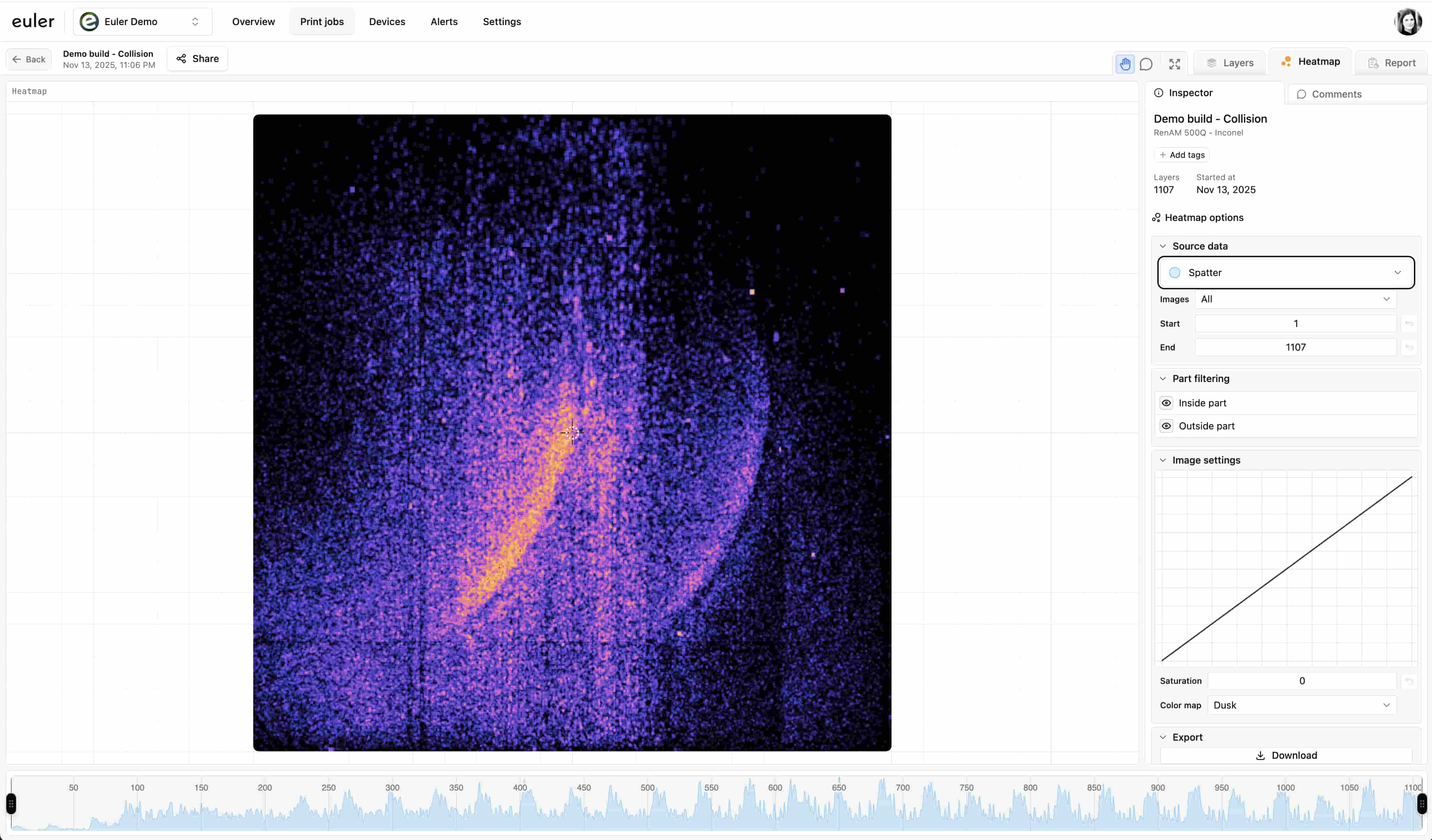
Choosing a view
Pick a view at the top of the sidebar:
- Volume: a 3D view of the build with defects shown where they occurred, layer by layer.
- Criticality: the 3D shape of the parts, colored by each layer's status, so you can see at which heights the build had problems.
- Heatmap: a flat, top-down map of the plate with all selected layers added together.
Regions of interest
Below the image, the frequency plot for the selected defect type is shown. Drag the handles at its left and right ends to limit the heatmap to a range of layers, for example the section where an alert was raised.
Source data
In Volume and Heatmap:
- The defect types: click the eye icon of the type you want to map. One type is mapped at a time. Streaking has the same Persistent only switch as in the Annotations list.
- Recoat and Exposure: choose which images to include.
- Inside part and Outside part: include defects on the parts, on the powder bed, or both.
In Volume you can also turn on:
- 3D geometry: an approximate 3D model of what was printed, drawn as a see-through X-ray view. Euler makes it automatically for every analyzed print, shortly after the print finishes, at the same time as the print report.
- Comments: show comments at the spot and height they were pinned to.
View options
- Color map (Volume and Heatmap): choose the color scheme, such as Match theme, Jet or Inferno.
- Saturation: make faint, low-frequency areas stand out, or tone down the brightest ones.
- Layer thickness (3D views): sets how tall each layer is drawn, so the 3D view has the right proportions. After you change it, click the save button next to it to keep it for this print.
- 3D opacity (Criticality, or Volume with 3D geometry on): how solid the 3D geometry looks.
3D view
In Volume and Criticality, the toolbar has 3D tools:
- Orbit tool: drag to rotate the view. Hold Shift to pan instead.
- Hand tool: drag to pan. Hold Shift to rotate instead.
- Region selection: drag the corners of the box to crop the view to part of the build. Hold Shift to move along one axis only, or Ctrl + Shift to move within one plane.
Scroll to zoom in and out.
Heatmaps in the report
The report includes heatmaps of key defect types, ready to print or save as PDF.