Alerts
What a critical alert is, who gets it, and how to respond.
Euler raises a critical alert when it finds critical defects in a print that is still running, so someone can check the build and act before it is lost. The alert covers the run of layers where the defect appears, and it shows on the print's frequency plot as a red marker.
Who gets notified
Each member who has Critical defect in print job turned on gets an email, with layer images. If your organization uses Slack, the alert is also posted to the channels set up for it. Admins can turn alerts off for a single device. See Notifications.
Responding to an alert
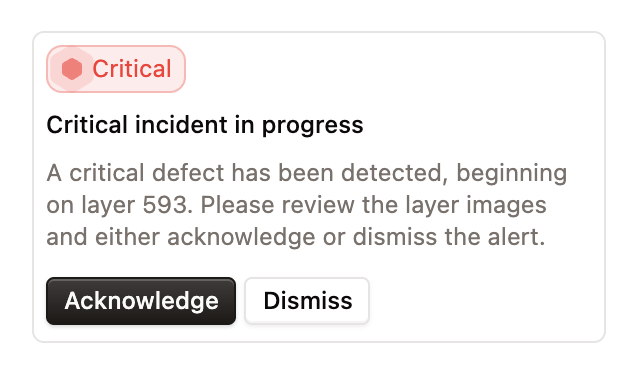
While a print is running, an open critical alert appears at the top of the print sidebar as Critical incident in progress. Clicking the card jumps the layer viewer to the layer where the defect began, so you can review the images before responding.
Each alert takes one response. Every response can carry an optional comment, which is shown with the response in the print's timeline so others can see what was decided and why.
| Action | Option | When to use it | Shown in the timeline as |
|---|---|---|---|
| Acknowledge | Continued | You dealt with the defect and let the print run on, with or without changes such as adjusting parameters or removing a part. | Continued print |
| Acknowledge | Stopped | You stopped the print because of the defect. | Stopped print |
| Dismiss | Mark as resolved | No issue was identified. | Dismissed |
| Dismiss | Snooze | You want to check again after 50, 100 or 200 more layers. | Snoozed until layer N |
Responding records what happened; it does not control the machine. Choosing Stopped does not stop the print, so stop it on the machine first.
Once acknowledged or dismissed, the alert card is hidden for the rest of the print. Euler closes the alert itself once the defect has cleared.
Snoozing
A snooze counts from the latest layer Euler has received. If Euler still detects the defect when the print reaches the snooze layer, the alert card returns and a Snooze ended event is added to the timeline. The same recipients are notified again by Slack and email, as for a new critical alert. You can then respond to the alert again.
Alerts in the timeline
Alerts and the responses to them appear in the print's timeline, alongside comments:
- Critical alert raised: added by Euler when the alert is created, with the layers the defect spans. Click the layers to jump to them.
- Continued print, Stopped print, Snoozed until layer N and Dismissed: the response, who gave it and their comment.
- Snooze ended: added by Euler when the print reaches a snoozed alert's layer.
While an alert is open, the timeline line is drawn in red. It ends when the alert is acknowledged, dismissed, or closes on its own.