Signed URLs
Signed URLs allow you to grant secure, temporary, read-only access to print jobs within the Euler platform. These URLs are programmatically generated by your application and include cryptographic signatures that verify their authenticity.
When Should You Use Signed URLs?
Signed URLs are useful when you want to:
- Provide temporary, controlled access to protected resources (e.g., print jobs).
- Securely share resources with external systems or users, while ensuring the access is limited in time and scope.
Examples of Use Cases
- Temporary access to print job data: Share live print job data with a client without adding them to your organization.
- Embedding: Show a print job inside your own application. See Embedding print jobs.
Supported Routes for Signed URLs
Signed URLs can be used with both backend API routes and specific frontend routes to securely access resources. Below is a list of the supported routes:
API Routes
A signed URL grants read access to your organization and its print jobs, so documented /api/* routes that read print jobs accept it. Routes that create, change or delete data do not. Refer to the API reference for details on specific endpoints.
Frontend Routes
The following frontend routes support Signed URLs (the method should be set to GET):
/app/[org-slug]/print/embed/[print-id]/app/[org-slug]/print/embed/ref/[device-slug]/[print-path]/app/[org-slug]/print/simple/[print-id]/app/[org-slug]/print/simple/ref/[device-slug]/[print-path]
If you're unsure whether a route supports Signed URLs or need assistance, feel free to contact us at hello@euler3d.com.
Generating signed URLs
Your application signs URLs itself, with an API token. There is no API call to make, so you can create a signed URL whenever you need one. The signing code is short; sample implementations follow.
Create an API token
In SettingsIntegrations & API, click Create token, then copy the Token ID and Token secret. The secret is shown only once. Keep it out of your code: use environment variables or a secrets manager. See API tokens.
Implement the signing logic
The examples below need no extra libraries and are easy to port to other languages. If you need help with a language that isn't listed, contact hello@euler3d.com.
import hmac
import hashlib
from datetime import datetime, timedelta, timezone
from urllib.parse import urlencode, urlparse, urlunparse, parse_qs

def create_signed_url(credential_id, secret, url, ttl_seconds, method="GET"):
    if ttl_seconds > 864000: # 10 days in seconds
        raise ValueError("TTL exceeds the maximum allowed value of 10 days.")

    parsed_url = urlparse(url)
    path = parsed_url.path
    query_params = parse_qs(parsed_url.query)

    # Sort query parameters by key
    sorted_query = "&".join(f"{key}={','.join(sorted(value))}" for key, value in sorted(query_params.items()))

    signed_at = datetime.now(timezone.utc)
    expires_at = signed_at + timedelta(seconds=ttl_seconds)
    algorithm = "sha256"

    # Get timestamps as seconds
    signed_at = int(signed_at.timestamp())
    expires_at = int(expires_at.timestamp())

    # Generate HMAC hash
    payload = f"{method.upper()}|{path}|{sorted_query}|{signed_at}|{expires_at}"
    hmac_hash = hmac.new(secret.encode(), payload.encode(), hashlib.sha256).hexdigest()

    # Add query parameters
    query_params.update({
        "euler-sig-algorithm": algorithm,
        "euler-sig-cred": credential_id,
        "euler-sig-signed-at": signed_at,
        "euler-sig-expires-at": expires_at,
        "euler-sig-hash": hmac_hash,
    })

    signed_url = urlunparse(parsed_url._replace(query=urlencode(query_params, doseq=True)))
    return signed_url

# ========= EXAMPLE USAGE =========
if __name__ == '__main__':
    signed_url = create_signed_url(
      credential_id="__API_TOKEN_ID__",
      secret="__API_TOKEN_SECRET__",
      url="https://www.euler3d.com/api/resource?type=example",
      ttl_seconds=3600, # 1 hour
      method="GET"
    )
    print(signed_url)
Test the URL
Open the signed URL in a browser or API client. Use a private window, or one where you are not signed in to Euler, so your own session doesn't make a broken URL look like it works.
If a Signed URL isn't working, paste it into Check a signed URL to troubleshoot issues with parameters or signatures.
Debugging signed URLs
Check a signed URL, under Signed URLs in SettingsIntegrations & API, checks a signed URL and tells you what is wrong with it.
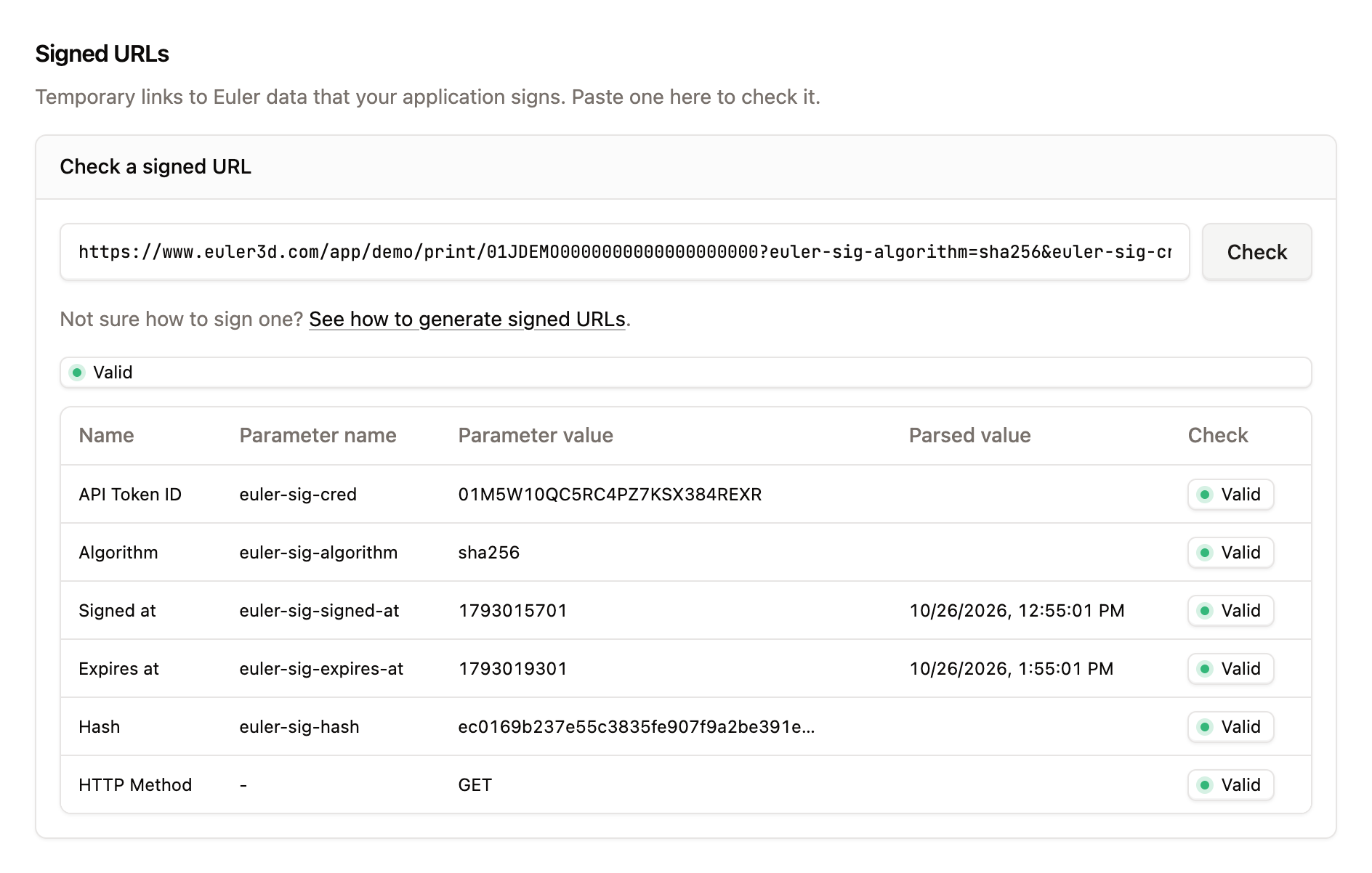
Using the debugger
- Open SettingsIntegrations & API.
- Under Signed URLs, paste your signed URL into Check a signed URL.
- Click Check.
- The table below the field lists each parameter (for example
euler-sig-credandeuler-sig-algorithm) with its value and a Check column that shows Valid or Invalid. An invalid row says what is wrong, for example an expired URL or a wrong signature.
Best Practices for Signed URLs
- Short Expiration Times: Use a short TTL to minimize exposure. The shorter the URL's lifetime, the less risk of misuse.
- Secure Secrets: Keep API secrets safe and rotate them periodically.
- Test Regularly: Use Check a signed URL to make sure your Signed URLs are working as expected.
How Signed URLs Work
A Signed URL is a regular URL with additional query parameters that include:
- Algorithm (
euler-sig-algorithm): Specifies the cryptographic hashing algorithm used (e.g.,sha256). - Credential ID (
euler-sig-cred): Identifies the API Token used to generate the URL. - Signed At (
euler-sig-signed-at): The timestamp when the URL was generated. - Expires At (
euler-sig-expires-at): The timestamp when the URL will expire. - Signature (
euler-sig-hash): A cryptographic hash generated using the API Token's secret, which ensures the URL's integrity.
When a Signed URL is accessed, the Euler platform verifies these parameters to ensure:
- The URL hasn't been tampered with.
- The signature matches the expected value.
- The URL is still valid (i.e., it hasn't expired).
Signed URL Specification
Each Signed URL must include the following parameters in the query string:
| Parameter | Description |
|---|---|
euler-sig-algorithm | The hashing algorithm used (must be sha256). |
euler-sig-cred | The unique ID of the API Token used to sign the URL. |
euler-sig-signed-at | The timestamp (in seconds) when the URL was created. |
euler-sig-expires-at | The timestamp (in seconds) when the URL will expire. |
euler-sig-hash | The SHA256 cryptographic hash generated from the payload <HTTP_METHOD>|<PATH>|<SORTED_QUERY_PARAMETERS>|<SIGNED_AT>|<EXPIRES_AT> using your API Token's secret. |
Signed URL flow
Learn More
- API Tokens Guide: Learn how to manage API Tokens, which are required to generate Signed URLs.
- Full API Reference: Explore detailed documentation for all available endpoints.
If you have any questions, reach out to hello@euler3d.com.